pinterested.

by Janetha on January 3, 2012

in how to

this post has been a long time coming. it’s mainly for my mom, but i think anyone who wonders how the hell pinterest works will benefit from it. note: if you are already an avid pinterest addict, skip this post. it’s simply a tutorial. instead of wasting your time reading it, you should probably waste more time pinning crap you want to make one day in the very far off future. or, at least, have good intentions to make…

okay! so, let’s talk pinterest.

image

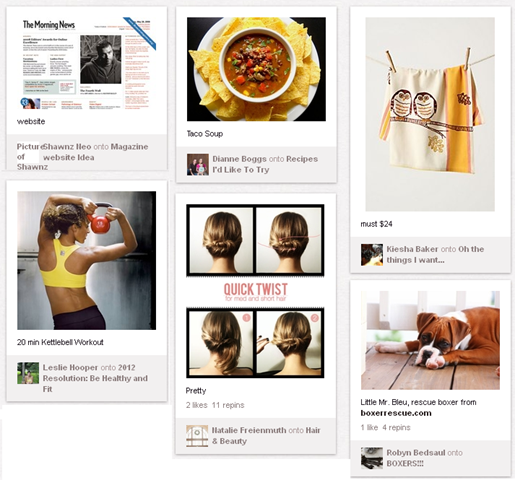
pinterest is a website that acts as a virtual bulletin board. it’s great for keeping track of websites you love, recipes you want to try, products you want to buy, workouts you should probably do, beauty tips you’ll never remember, and photos of really cute dogs.
image

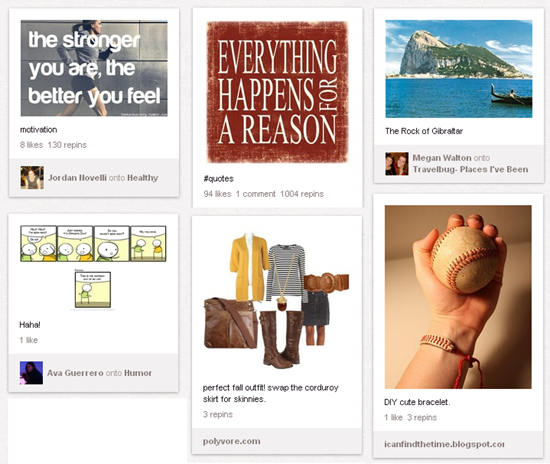
that’s just the tip of the iceberg, though. pinterest is also great for finding motivation, tracking down awesome quotes, planning a vacation, having a laugh, putting together a cute outfit, and figuring out the perfect DIY project for a rainy day.
image

overwhelmed yet? it gets even more overwhelming. i haven’t even started the tutorial yet!

here we go.

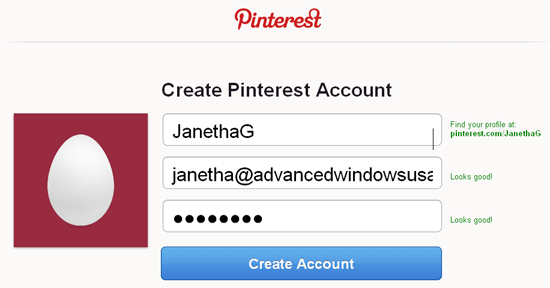
first things first.. you need to sign up for a pinterest account. you have to have an invite, like it’s some sort of secret club. you can request one here, or you can ask your facebook or twitter friends to invite you.. i am sure somebody is ready and willing to send you an invite to waste YOUR time so they can feel better about the time THEY waste on pinterest.

i invited myself to pinterest using an alternate email so i could walk you through the setup steps.
image

once you have an account, you will jump through a few setup hoops. you will first be asked to click on things that interest you. the kicker is you have to click on at LEAST one thing to move to the next screen, but it will also force you to automatically follow people. don’t worry, you can unfollow these people in the next step. and yes, i will get to the whole “following people” thing in a bit.
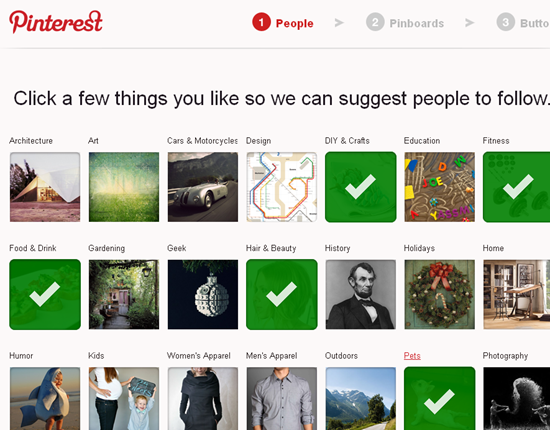
image

once you have selected some topics, your profile will automatically follow some preset people. if i were you, i would simply click “unfollow” to all the people it automatically followed for you. click the unfollow buttons (i’ve circled them in red) before moving onto the next step.
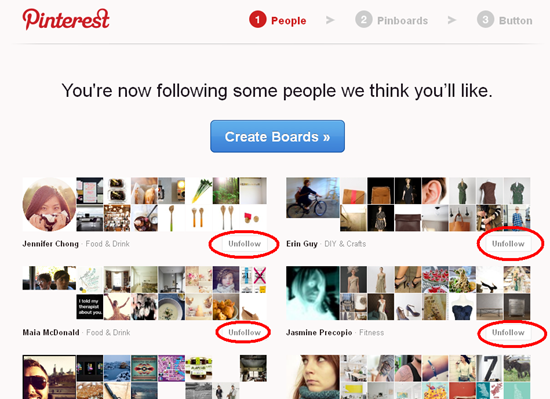
image

NOW click “create boards” to make your pinboards. there are five preset boards that pinterest will create for you, but feel free to personalize these, delete them, or leave them as they are.
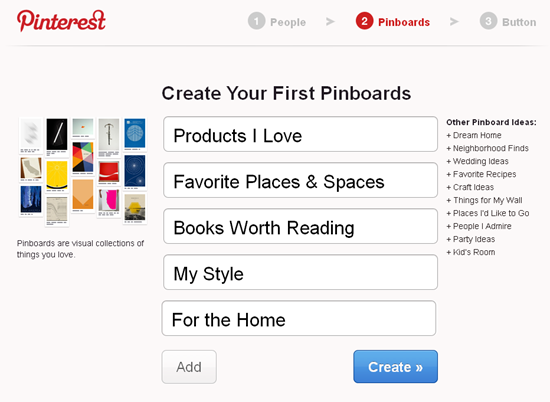
image

as you can see, i have changed my boards.. i went with four, but i can always add more or remove existing boards.

image

the next step is installing the “pin it” tab in your browser’s toolbar. this is something you DEFINITELY want to do.

image

pinterest has made a great tutorial video to walk you through that step. it can be found here. that link is for firefox.. if you use IE or safari or something else, just search for that tutorial. after you do this, you will have a Pin It link in your toolbar. you will use this when you are on other websites.. NOT when you are on pinterest.

image

now you’re ready to start pinning!

before we hop into that, let’s talk profiles. all screen shots from now on will be from my actual pinterest account. follow me here!

to customize your profile, use the top right dropdown menu.

image

you can invite friends, find friends (using facebook and twitter), view/edit your boards, view/edit your pins, view/edit your likes, change your settings, or logout.

for the sake of time, i am not going to talk about all these features.. but i will touch on the whole friend thing.

pinterest is a lot like twitter and facebook in the sense that you have friends and you follow other people and people can follow you. basically, you can follow people and their pins will show up in your feed. once you find a friend, click on their profile to look at their boards.
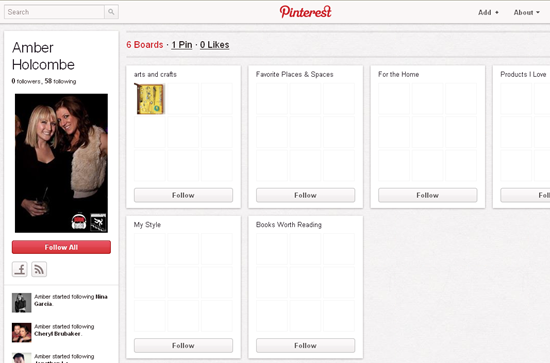
image

you can click “follow all” to follow everything they pin, or can opt to follow only a few of them.  let’s say your friend has four boards: recipes, crafts, fitness, and babies. because i am not into babies, i would opt to follow the recipes, crafts, and fitness boards.. but wouldn’t follow the babies board. as you can see in the screenshot above, you can follow the boards individually using each button. you can always change your mind and follow or unfollow a board later.

if you have more questions about following friends or boards, please ask. i don’t want to go anymore into it because i think i’ve covered the basics.

one more thing i want to touch on before i talk about the actual pinning is how you can manage your own boards and pins.

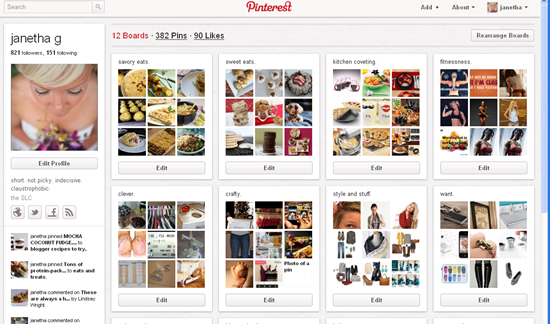
here’s my profile page:
image

as you can see, i have 12 boards. i can rearrange the order that the boards appear using the button in the top right corner of the screen. i can view or edit any board by clicking on it.

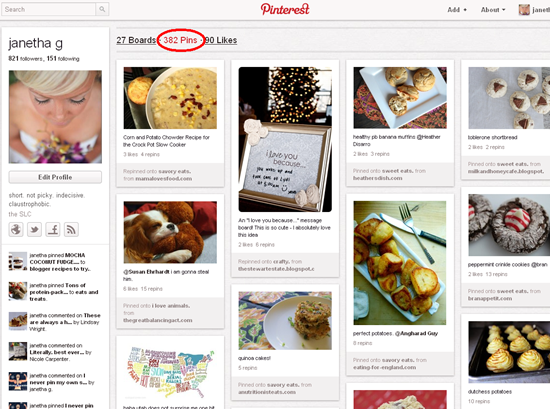
if i want to view ALL of my pins, i would simply click the link in the top middle—which will say the number of pins you have with the word “pins” after it.
image

all of my pins appear in order of when i pinned them. this is EVERYTHING i have pinned. if i wanted to view the pins for a specific board only, i would click on that board.

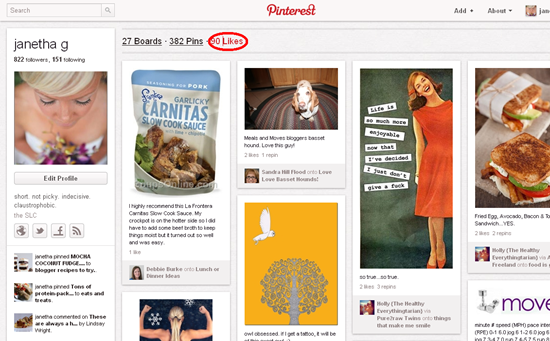
you can also “like” various pins without actually repinning them to your own boards. you can view everything you have liked using the link at the top of your page.
image

those are the basic ropes of navigating your profile. time for the good stuff.

now, there are two ways to use pinterest: repinning things that are already pinned and pinning new items from outside websites.

i am going to explain both.

first: repinning (and searching for!) pins already on pinterest.

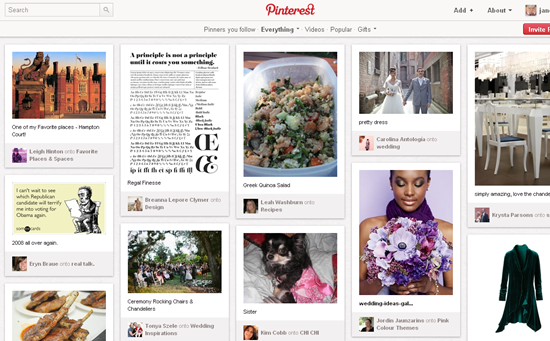
go to the home page.

image

select what type of feed you want to view:

  • people you follow
  • specific categories (everything, or use the drop down menu to select a category)
  • videos
  • popular pins
  • gifts (there is a filter to select price range)

scroll your heart out!
image

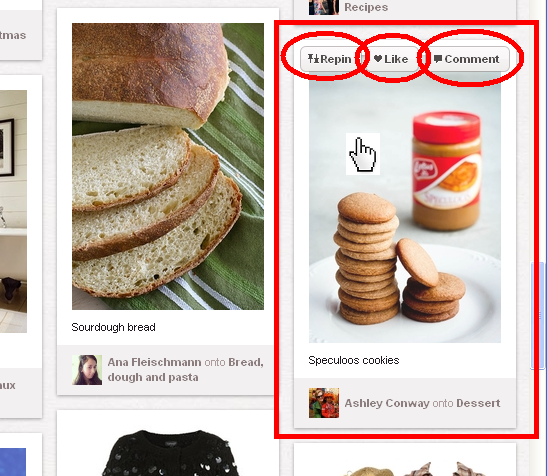
when you see something you like, you can quickly repin it, like it, or comment on it.  you can also view the pin in detail, but i will touch on that after i show you how to repin something. simply hover your mouse over the photo/pin.
image

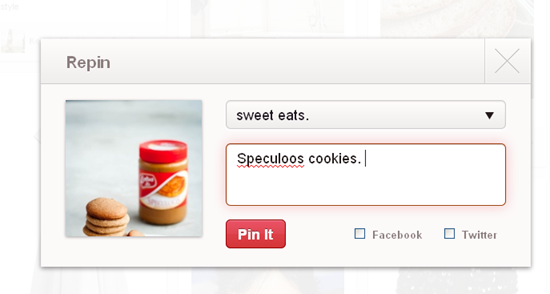
if you select to repin it, a screen will appear.
image

you will be able to use a drop down menu to select which of your own boards you want the pin to appear on. i have selected “sweet eats”. the original description that appeared under the pin will autofill.  you can change the description, add to it, or leave it the same. you can also checkmark facebook or twitter (or both) if you want the pin to appear on your social media profiles. once you have all your options set, click “Pin It”!

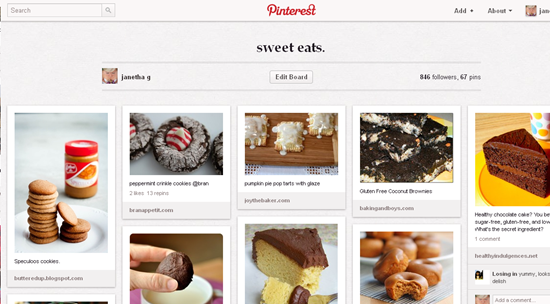
you will be taken back to the screen you were previously on so you can continue browsing.. but if you want to view your pin on your board, just use the top right corner bar to check it out.
image

as you can see, my most recent pin on my “sweet eats” board is the cookies i just showed you how to pin.

you are probably wondering WHY you’d want to pin a photo of some cookies. whoopdeedoo, right? a photo of cookies.. what am i going to do with that?!

well.. the whole point of pinterest is to pin other websites.. meaning each photo you pin leads you to the website where the photo lives!

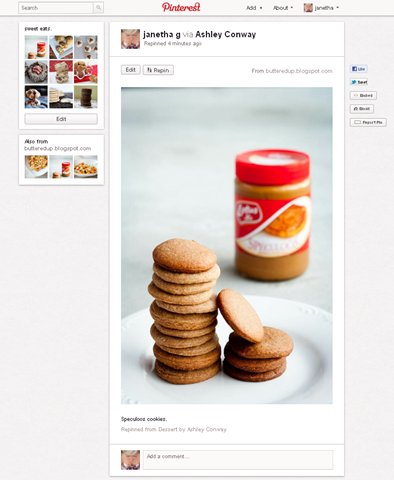
to do this, click on a pin. any pin. from your boards, from your friends’ boards, from the main feed.. just click on any pin. it will take you to a full screen shot of the pin.
image

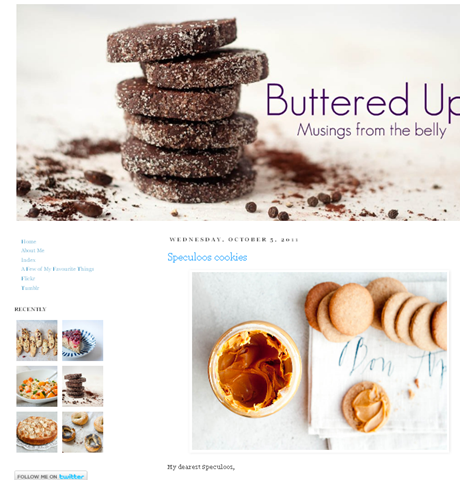
from here, you want to click on the photo again and you will be taken to the website where the photo lives!
image

voila! there’s the website that goes to the photo of the cookies we pinned.. complete with recipe.

pretty handy, right? basically pinterest is a visual bookmark folder. no more bookmarking things in your browser to forget about them for time and all eternity.. now you can actually see all the things you bookmark which will help you actually remember to make use of them.

still with me?

good.

now i am going to show you how to pin something from a website. this is why pinterest is super handy, if you ask me.

let’s use my blog, for simplicity sake.

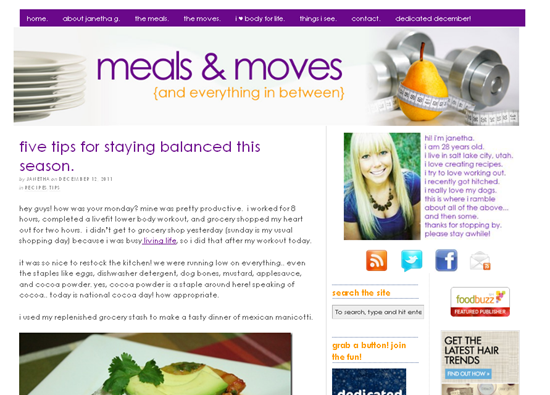
let’s pretend we are reading my post about mexican manicotti.
image

as a reader, i decide that i really like that recipe and want to make it sometime. so, instead of bookmarking it, i decide to pin it to my “savory eats” pinboard for future reference.

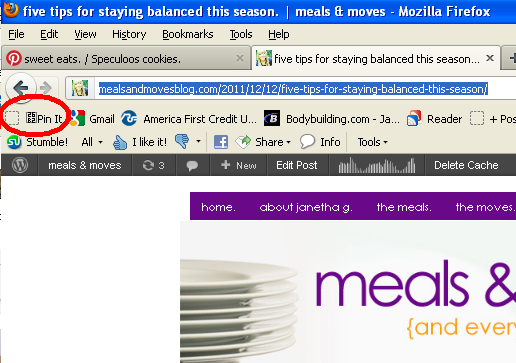
to do this, i click the “pin it” button that i installed in my browser when i signed up for pinterest (mentioned above.)
image

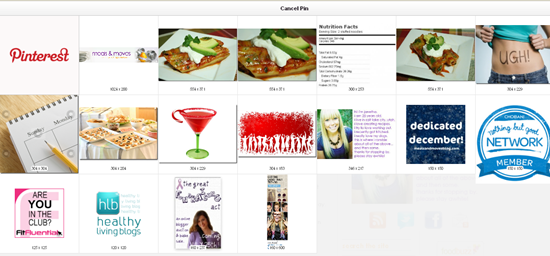
after i click this button, a screen appears that has all the photos that are on the current page (aka my blog post.)
image

i simply select the photo i want to represent my pin. by the way—i talked about healthy holiday habits in this same post, so if i wanted to pin this post to my “tips” board, i would opt to select a photo to represent that.. like the pencil and calendar instead of the manicotti.

but, we are pinning the manicotti, so i will select the photo i want to pin. let’s go with that first one.

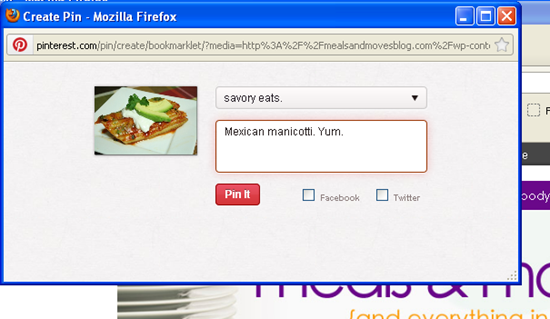
hover over the photo and select “pin this”. a popup window will appear where you can fill in details.

image

use the drop down menu to select the board you want to use, type in a description, and decide if you want to share it on facebook or twitter.
image

click “pin it” and it’ll be on your pinboard the next time you look at it! the popup box will disappear and you can keep reading the page you pinned from—in this case, my mexican manicotti post.

pretttttty radical, right?

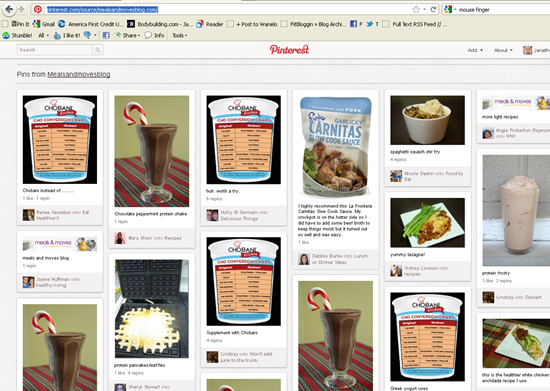
one more thing i want to point out that may be helpful to bloggers—you can always check to see what items were pinned from a specific website. you type “http://pinterest.com/source/INSERT WEBSITE HERE/” to see all pins from that site. for example, if i want to see what has been pinned from mealsandmovesblog.com, i would simply type: “http://pinterest.com/source/mealsandmovesblog.com/

hit enter and all the pins anyone and everyone have pinned from my website appear!
image

fun.

and a final note: i think it’s tacky to pin stuff from your own website in order to get page views. some people don’t agree with this, but i personally think it’s strange. why would you want to pin something from your own site—you wrote it, you obviously already know about it and will remember it.  the ONLY thing i have ever pinned from my own site was dedicated december, and even then i was skeptical about doing it. i think pinterest should be used to keep track of ideas that are not your own. leave the pinning of stuff from your own website to others. ya know? this is actually mentioned in the “pin etiquette” section of the website. there are a few other helpful hints when first getting started, too, so make sure you check that page out.

wow, that was long, right?! hope you liked this little tutorial and it helped explain just EXACTLY what pinterest is. if you have questions, ask away. i’m here to help with your future addiction.

Q~ are you a pinterest addict?

xo. janetha g.

{ 56 comments… read them below or add one }

1 amanda January 3, 2012 at 6:26 pm

That… was awesome! I’ve been using Pinterest for a few months and mostly just flailing around like a fish out of water. I had most of the basics in place, but your tutorial really nailed things down and was quick and easy. I have to say; if it weren’t for Pinterest, I don’t know that I would have ever discovered the world of fitness pictures that are basically super fit girls, slathered in baby oil, in various states of tugging down their drawers! I no longer view those pages when my husband is sitting next to me because he considers it a free pass to ogle.

Reply

2 Elisse January 3, 2012 at 6:33 pm

I am a total pinterest addict! Great, informative post. You are very thorough ;)

http://pinterest.com/elisselauren/

Reply

3 Diana January 3, 2012 at 6:41 pm

Nice post! I was able to break away from my Pinterest habit over the holidays, but I definitely was busy last night and then again when I got home today…well, while I was waiting for my shepherd’s pie to finish cooking in the oven. It was a great way to kill 30 minutes. Haha! :)

Reply

4 Brooke @ Exercise For Fries January 3, 2012 at 6:57 pm

HA! I have to send this to my mom. She tried asking me what Pinterest and I was horrible at explaining it.

Reply

5 lynn @ the actor's diet January 3, 2012 at 7:16 pm

this is so thorough!!!! i love pinterest.

Reply

6 Averie @ Love Veggies and Yoga January 3, 2012 at 7:17 pm

Yes I love Pinterest. I jumped on board about 6 mos ago. Prior to that I thought it was just another social media tool I didnt need, want, or have time for. I have realized the serious error in my ways b/c nothing has reignited my love of the internet and of blogs and blog-ish things like pinterest.

I also pin things JUST so I can remember to make them at a future date. An online file cabinet :)

Reply

7 Christin@purplebirdblog January 3, 2012 at 7:18 pm

Nice tutorial, J! I didn’t know about the source part to view what has been pinned from whatever site, and I was blown away to see so many people pinning my chickpea cookies. Very cool. I’m with you on the whole idea of pinning your own stuff for page views. Not my style.

Reply

8 Ashley @ Coffee Cake and Cardio January 3, 2012 at 7:23 pm
9 sarah @ sarah learns January 3, 2012 at 7:30 pm

i’m with you on the not loving when people pin their own things. i’ve seen a couple other friends/fellow bloggers do it & i think it’s a bit strange. like fishing for page views…

Reply

10 Danielle @ D. Sells Seashells January 3, 2012 at 7:33 pm

I’m totally addicted. Proudly so!

Reply

11 Lori Z. January 3, 2012 at 8:01 pm

Thank you so much for that very informative post!! I was invited to Pinterest when I was away over Christmas. I made my account and forgot about it until a few nights ago. I kind of played around but had no idea what to do. I made a board with a bunch of motivational sayings and haven’t been back since… Makes a lot more sense now – I had no idea I could pin things when I am on a website. Looks like I’ll be wasting even more time on the computer now! ;)

Reply

12 Tina @ Best Body Fitness January 3, 2012 at 8:12 pm

And now you have me wanting to join. Something I thought I would never say. In fact, I don’t even have invites anymore since I deleted them long ago!

Reply

13 Carbzilla January 3, 2012 at 8:13 pm

You freaking rock.

The “not into babies” thing killed me. I guess I’ll learn to forgive you when you’re “all about babies.” :)

The worst part of Pinterest is clicking on the blog link and then HAVING to read 6 months of new-to-me, awesome blog posts. I may never buy another book!

Love you!

Reply

14 Shannon @ Her Dog Blog January 3, 2012 at 8:18 pm

I didn’t get it at first, but now I’m addicted! So many amazing ideas and photos. The Humor section might be my favorite, though!

Reply

15 Elizabeth @ reads recipes runs January 3, 2012 at 8:42 pm

I am emailing this to my mom, I had a hard time explaining it to her :)

My husband saw me on Pinterest and thought it was “Pinterfest” new holiday?

Reply

16 BroccoliHut January 3, 2012 at 8:58 pm

Great post! Just sent this to both my parents so they might be enlightened.

Reply

17 Jenn (GH) January 3, 2012 at 9:40 pm

This was awesome! I joined Pinterest not long ago and still can’t figure out how to unfollow all those people it automatically followed. I’m going to use to your explanation to see if I can do it. Pinterest was super helpful in keeping track of things I wanted to buy or be inspired by when I was redecorating my RV.

Reply

18 Tee @ She Writes, Bites, and Window Shops January 3, 2012 at 9:53 pm

Great tutorial post! I jumped on the Pinterest bandwagon a few months ago. It is SO addicting! There are so many creative ideas in one place!

Reply

19 Nicole C January 3, 2012 at 10:00 pm

I would high five you right now if I could. I don’t have to explain a damn thing to anyone about pinterest anymore woohoo! I will just send them this link. My Mom will thank you, I am sure of it :)

Reply

20 Hope January 3, 2012 at 10:07 pm

Thank you for the Pinterest tutorial! I’ve had no idea how to use or what it even is. Thanks for explaining it. It seems awesome :)

Reply

21 Jessica January 3, 2012 at 11:46 pm

I LOVE pinterest! I use it to bookmark recipes I want to make, pictures I like and cute dog pictures, among other things. Thanks for this tutorial, it is very helpful!

Reply

22 Ellen Clifford January 3, 2012 at 11:50 pm

Hmm, not an addict but I am signed up … I confess I’d been thinking of pinning a few things from my website simply to have favorite photos or recipes consolidated, never even thought of it for publicity…I dunno, I’m new to the pin world:) would hat be considered tacky?

Reply

23 Janetha January 4, 2012 at 2:20 pm

That makes sense! I just think it is lame when people pin every single one of their posts as self promotion to try to get their stuff on Pinterest.

Reply

24 Mary (A Merry Life) January 3, 2012 at 11:53 pm

I’m not an addict but I’ve been on there for a while. I almost skipped this post but skimmed it instead and I’m so glad I did! “http://pinterest.com/source/INSERT WEBSITE HERE/” is something I didn’t know how to do but was trying to figure out earlier today. You saved me! I was wondering why I had a bunch of traffic coming to my blogs and now I can see what they have pinned… no more guessing. Thanks Janetha! :)

Reply

25 Kristin @ STUFT Mama January 4, 2012 at 12:00 am

Thanks for the tutorial. I’m on stinking Pinterest, but I’ve been to scared to really be on it. My boards are embarrassing. Ha. I need to follow your tips and get a move in. Ha! So much good info here. You rock!

Reply

26 Jennyb January 4, 2012 at 1:10 am

fab tutorial! I’ve been transfereing all my book marked pages/recipes to there – probably not anymore likely to get round to making them!

Very good for craft ideas & patterns, love it for that.

Reply

27 Emily January 4, 2012 at 6:04 am

Sending this blog entry to my mother as well. I showed her pinterest over the holidays (I might be addicted!) and she didn’t get it. She liked it a lot, but just didn’t really make sense of it.

Thanks!

Reply

28 Lauren @ Oatmeal after Spinning January 4, 2012 at 6:10 am

I’ve actually only been on Pinterest twice. It’s blocked at my work (like all other fun sites) and I’m not on the computer much at home, Damn the man.

Reply

29 Susan January 4, 2012 at 6:32 am

I’m still learning to like Pinterest. I have a very thorough and organized bookmarking system on my computer, so I don’t really *need* Pinterest to remember things. Apart from food blogs, I don’t really go on a lot of sites with pretty pictures worth pinning. And I’m not that big into fashion or decorating. But I DO like it for cute pictures of animals :)

Reply

30 Lindsay @ In Sweetness and In Health January 4, 2012 at 7:28 am

I LOVE pinterest :D. And I’ve already been following you!!

Reply

31 Errign January 4, 2012 at 7:53 am

I enjoy creepin’ on pinterest for funny & inspirational sayings!

Reply

32 Kelli Preston January 4, 2012 at 8:34 am

Great post! I am just figuring this whole pinterest nonsense out.

Reply

33 Shannon January 4, 2012 at 9:13 am

I actually just signed up for a request yesterday. I have no idea how long it’ll take. Probably should have asked my friends/family on FB… Can’t wait to start using it!!! This is right up my alley! Thanks for the tutorial!

Reply

34 Holly January 4, 2012 at 9:29 am

Ok so this was AWESOME. I have had Pinterest for a while now, but I honestly had NO idea that I could install the ‘pin it’ button at the top. Guess I should actually read the tutorial next time ;) I have now added it to the top of my computer….pinterest better get ready…I’m about to overload it :D Thanks J!

Reply

35 Katie January 4, 2012 at 9:33 am

I’m going to send this post to my sister-in-law…she keeps asking about how it works. Thank you…from my SIL. :-)

Reply

36 Lindsay @ Lindsay's List January 4, 2012 at 9:56 am

You KNOW that I have to leave this link:
http://lindsayslist.co/2011/10/hooray-i-got-in/

Reply

37 Ananda January 4, 2012 at 10:07 am

I’m on Pinterest too but I didn’t about half of what you mentioned, so thanks! that was helpful!

Reply

38 The Healthy Hostess January 4, 2012 at 11:36 am

Loved the tutorial! I sent this straight to my mom and my mother in law. They are in need of a lesson and I am glad you are willing to do it!
:) Happy New Year!

Reply

39 Jennie (the gf-gf) January 4, 2012 at 11:38 am

This is actually super helpful, I had no idea I could see what people are pinning on my site!

Reply

40 Annette@EnjoyYourHealthyLife January 4, 2012 at 12:02 pm

WOW. That was super helpful–stuff I didn’t know about (I am already pinning), so thank YOU! I sometimes pin my own workouts because I have friends who don’t necessarily read blogs but love pinterest–so it helps give ‘em ideas to get their booty the gym. Otherwise, then no.

Love this! thx.

Reply

41 meggi January 4, 2012 at 12:20 pm

Great tutorial! I signed up for pinterest for help with a baby shower I am throwing for a friend who’s having twins. I only get on their sporadically because sometimes it’s overwhelming :)

Reply

42 Sara January 4, 2012 at 12:24 pm

Holy crap. I see the light. I had NO IDEA that pintrest could be helpful. I got invite like 2 weeks ago and pretty much just clicked on stuff. You made it make so much sense (esp. in the recipes I’d like to try section). I seriously did not see the point until I read your post. Thanks so much!

*PS give Randy a squeeze from his instragram buddy

Reply

43 misszippy January 4, 2012 at 1:01 pm

Wow–thank you for all that fab info! I have an account but have yet to use it. You make a pretty compelling argument for why it might be worth a go. I’m so afraid of the time suck, but…

Reply

44 Biz January 4, 2012 at 1:32 pm

Wow, thanks for the tips, I had no idea – I just see that people “pin” my recipes but I had no idea what that exactly meant. And yes, I don’t know how to twitter or do much on facebook either. :D

I actually knew bloggers who would “stumble” theselves on a daily basis to get more traffic – crazy!

Reply

45 Allison January 4, 2012 at 2:52 pm

WOW! That was so thorough… I started pinning a few months ago and love it- especially for motivational quotes, cute animals, recipes, and wedding ideas :D

P.S. Beautiful profile picture and I’m “following” you!

Reply

46 cindylu January 4, 2012 at 2:58 pm

I signed up for Pinterest a few months ago, but hadn’t started doing anything with it because I didn’t feel like taking the time to learn. I have several recipes and wedding inspiration ideas I lose track of because I don’t have a good bookmark system. Anyway, thanks for the tutorial. I’ve been a pinning machine today.

Reply

47 Sarah @ The Healthy Diva January 4, 2012 at 3:02 pm

I’m currently on the waiting list for pinterest but love browsing around there!!! It can really suck you in though….I’ve been on there for hours at times. Can’t wait til it actually lets me have an account! C’mon pinterest….pick me pick me lol

Reply

48 EGrizz January 4, 2012 at 3:42 pm

I have signed up for Pinterest awhile ago but have never gotten an “invite” I know this may sound crazy but can you send me an “invitation” I really want to try it!

Reply

49 Sarah @ The Healthy Diva January 4, 2012 at 4:24 pm

Thanks for the invite!!!! let the repinning begin :)

Reply

50 emily (a nutritionist eats) January 4, 2012 at 5:55 pm

Such a great post, thank you!!!

Reply

51 Marisa January 4, 2012 at 7:25 pm

You should have featured the fact that people gave you Christmas gifts based on pins you made. ;) this tutorial is great and I learned even more!

Reply

52 Sarah January 4, 2012 at 7:33 pm

I’m a pinterest junkie! And this is a great tutorial which I will forward to my mother because I’m tired of trying to explain pinterest to her!

Reply

53 Melissa January 5, 2012 at 12:24 am

“…or you can ask your facebook or twitter friends to invite you.. i am sure somebody is ready and willing to send you an invite to waste YOUR time so they can feel better about the time THEY waste on pinterest.”

no truer words have ever be written. :)

Reply

54 Jessy (squeezetheday) January 5, 2012 at 12:03 pm

I love Pinterest, but I totally agree with you on people pinning their own stuff. I think it’s tacky as hell. Some people even pin their own photos or photos of their family … weird.

Reply

55 Nicole January 9, 2012 at 7:29 am

thanks for this post!! i always wondered about pinterest,
know i know that this is exactely what i’ve been looking for!
since i use a few different computers (@home, @work, @friends)
you can bet i don’t have the bookmark on the right one when i
need it! :)
so…. can you “invite” me? ;) since i’m from switzerland i know very
few people how use it (only bloggers!) ;)…. if that’s possibile it’s great
if not… i understand! :)

Reply

56 Kirshna February 28, 2012 at 1:52 pm

Thanks Janetha for introducing me to Pinterest. Now I’m ready to get started!

Reply

Leave a Comment

Previous post:

Next post:

FTC Disclosure. Disclaimer. Site designed by Zesty Blog Consulting.